Originally published on Medium, January 2022. Republished here with light edits — the original project’s source code no longer exists, only this write-up survived, so the code snippets below are described rather than shown.
A ray-tracer is a rendering method that simulates light reflections, refractions and shadows. It follows a light path from a specific source and computes each pixel in the image to simulate the effect of the light.
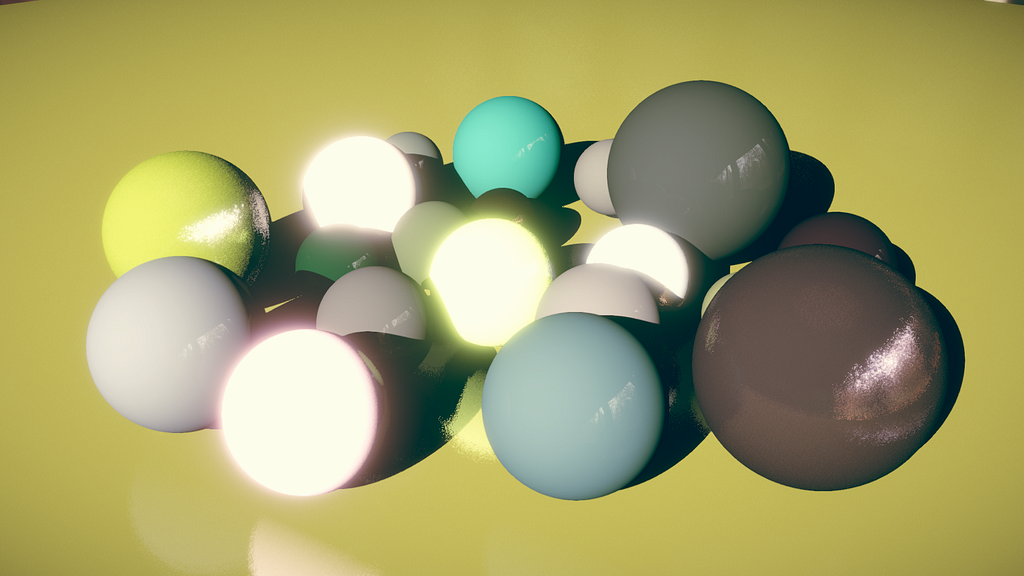
Following the Ray Tracing in One Weekend book by Peter Shirley, I wrote an implementation of a ray-tracing algorithm using Unity compute shaders and the Universal Render Pipeline to render spheres in real time.
The ray-tracing algorithm works by casting rays from a camera to each pixel on the screen using UV space, where each pixel has coordinates between zero and one. A ray represents a light path between a source and an observer camera.
When a ray hits an object, it gets reflected in the world by using the laws of optics. Each object surface has an orientation determined by its normal vector.
Unity already has an implementation of a camera that uses linear algebra and matrix multiplication to convert a vector between world space and screen space. To find the ray origin in world space, you multiply this matrix with the camera position. To cast a ray toward a specific pixel, a series of matrix multiplications maps the pixel’s UV coordinates to a normalized direction — and finally, a ray carries a specific amount of energy that “illuminates” the world.
struct Ray {
	float3 origin;
	float3 direction;
	float3 energy;
};

Ray CastRay(float2 uv) {
	Ray o;
	o.origin    = mul(_CameraToWorld, float4(_CameraPosition, 1.0f)).xyz;
	o.direction = mul(_CameraInverseProjection, float4(uv, 0.0f, 1.0f)).xyz;
	o.direction = mul(_CameraToWorld, float4(o.direction, 0.0f)).xyz;
	o.direction = normalize(o.direction);
	o.energy    = float3(1.0f, 1.0f, 1.0f);
	return o;
}
A sphere has a central location in 3D space and a radius. Its surface, as seen by the ray-tracer, is found using an approach related to ray-marching: by taking smaller steps you can approximate the exact position where a ray meets the sphere’s surface, which reduces to finding the coefficients of a quadratic equation.
bool Hit(in Ray ray, inout HitInfo hit) {
    float3 location = ray.origin - center;
    float a = dot(ray.direction, ray.direction);
    float half_b = dot(location, ray.direction);
    float c = dot(location, location) - radius * radius;
    float delta = half_b * half_b - a * c;
    if (delta >= 0) {
        float root = -1.0f * (half_b + sqrt(delta)) / a;
        if (root < 0 || hit.distance < root) {
            root = -1.0f * (half_b - sqrt(delta)) / a;
            if (root < 0 || hit.distance < root)
                return false;
        }
        hit.distance = root;
        hit.position = ray.Evaluate(hit.distance);
        hit.normal   = (hit.position - center) / radius;
        hit.material = material;
        return true;
    }
    return false;
}
Changing a ray’s origin, direction and energy when it hits a surface is called ray scattering. A material’s attributes determine how an object looks by changing the way light scatters off it. The new ray direction is calculated by reflecting the incoming ray against the surface normal. A rough surface deflects light more randomly around that normal, an emissive object behaves like an “artificial light” source, and a metallic object scatters much more light than a diffuse one.
float3 Scatter(inout Ray o, float3 p, Material mat) {
    o.origin    = p + mat.normal * 0.001f;
    o.direction = reflect(o.direction, mat.normal) + mat.roughness * SampleHemisphere(mat.normal);
    o.energy   *= mat.specular * sdot(o.direction, mat.normal, mat.metallic);

    Ray sRay = CreateRay(o.origin + mat.normal * 0.001f, -1.0f * _DirectionalLight.xyz);
    HitInfo sHit = Trace(sRay);
    if (sHit.distance != 1.#INF) return float3(0, 0, 0);
    else return mat.albedo;
}
A fragment shader computes the material attributes that determine the final pixel color during the scattering stage — the emissive color and intensity from albedo values, lighting and shadows on the object, and the reflection direction from normals and roughness.
void Frag(inout Material o, float3 normal) {
    o.roughness = o.roughness / 10.0f;
    o.normal    = normal + o.roughness * SampleHemisphere(o.normal);
    o.lighting  = sdot(o.normal, _DirectionalLight.xyz) * _DirectionalLight.w;
    o.albedo    = o.lighting * (10.0f * o.emission * o.intensity + o.albedo);
}

float4 Shade(inout Ray ray, in HitInfo hit) {
    if (hit.distance < 1.#INF) {
        Frag(hit.material, hit.normal);
        return float4(Scatter(ray, hit.position, hit.material), 0.0f);
    }
    else return ray.CalculateSkybox();
}
Conclusion
Ray tracing is a technology that can produce beautiful graphics and realistic lighting by casting rays from the camera and computing reflections, refractions and shadows to approximate real-world light behavior. It’s a technology that keeps evolving, and keeps promising more convincing worlds and light.
To learn more about compute shaders and ray tracing, I’d recommend Ray Tracing in One Weekend by Peter Shirley and GPU Ray Tracing in Unity by David Kuri — the two sources I originally learned from.